Damaged Charging – A smartphone charging port is one of the most heavily used components on any mobile device. Every day, users plug and unplug charging cables multiple times, exposing the port to physical stress, dust accumulation, moisture, and accidental damage. Over time, these factors can lead to charging issues that range from slow charging to complete charging failure. While many smartphone users assume that a battery problem is responsible for charging difficulties, the charging port itself is often the real culprit.
One of the biggest challenges with charging port damage is that the symptoms can appear gradually. A phone may initially charge only when the cable is positioned at a certain angle. Later, the charging connection becomes unstable, causing intermittent charging interruptions. Eventually, the device may stop charging altogether. Understanding the warning signs early can help prevent more extensive hardware damage and costly repairs.
Charging port problems affect virtually all smartphone brands, including Samsung, Xiaomi, Oppo, Vivo, Huawei, Motorola, Infinix, Tecno, iPhone, and many others. Regardless of the device manufacturer, the charging mechanism relies on small metal contact pins that transfer power from the charger to the battery management system. When these pins become bent, corroded, loose, or covered with debris, charging performance suffers significantly.
The good news is that not every charging port issue requires professional repair. In many cases, a simple cleaning procedure or a basic inspection can restore proper charging functionality. Before spending money on replacement parts, it is essential to diagnose the exact cause of the problem. Proper troubleshooting can save both time and money while extending the lifespan of your smartphone.
Common Signs of a Damaged Charging Port
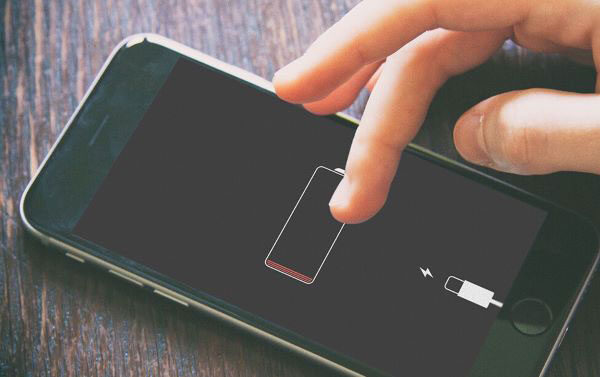
Recognizing the symptoms of a damaged charging port is the first step toward a successful repair. One of the most obvious indicators is when the smartphone refuses to charge despite using a working charger and cable. Users may notice that charging begins and stops repeatedly, creating an inconsistent power connection. This issue typically suggests poor contact between the charging cable and the charging port pins.
Another common symptom is the need to wiggle the charging cable to establish a connection. If the device only charges when the cable is held at a specific angle, the internal contacts may be loose or damaged. Physical wear inside the port often develops after years of regular use, particularly when users frequently disconnect chargers by pulling the cable rather than the connector itself.
Slow charging can also indicate charging port damage. While many people immediately blame the battery or charger adapter, a damaged charging port can restrict power flow and reduce charging efficiency. Corrosion, dirt buildup, and damaged contact pins can increase electrical resistance, preventing the phone from receiving adequate charging current.
Visual inspection may reveal additional signs of damage. Bent pins, lint accumulation, discoloration, corrosion, or physical cracks inside the charging port are all warning signs that should not be ignored. If moisture enters the port, corrosion can develop quickly and cause permanent damage. Identifying these symptoms early allows users to take corrective action before the problem worsens.
Why Charging Ports Fail Over Time

Charging ports experience constant mechanical stress throughout the life of a smartphone. Every insertion and removal of a charging cable creates friction against the delicate contact points inside the port. After thousands of charging cycles, these components naturally begin to wear down. Even high-quality smartphones are not immune to this gradual deterioration.
Dust and pocket lint are among the most common causes of charging port failure. Smartphones spend significant time inside pockets, bags, and other environments where small particles accumulate. These particles gradually compact inside the charging port, preventing the charging connector from seating properly. Many charging problems are resolved simply by removing years of accumulated debris.
Moisture exposure presents another serious threat. Water, humidity, sweat, and accidental spills can cause corrosion to develop on internal charging contacts. Corrosion acts like rust, disrupting electrical conductivity and weakening metal components. In severe cases, corrosion can spread to nearby circuit board components and create more complex repair challenges.
Improper charging habits also contribute to charging port damage. Using low-quality charging accessories, forcing cables into the port, charging while gaming, or repeatedly dropping the phone while connected to a charger can place excessive strain on the charging assembly. By understanding these risk factors, smartphone owners can adopt better charging practices and significantly extend the lifespan of their device’s charging port.
Repairing Loose Charging Port Connections
A loose charging port is one of the most frustrating smartphone problems because the device may appear to charge normally one moment and disconnect the next. Users often find themselves holding the cable at unusual angles or placing objects under the connector just to maintain a charging connection. This behavior is a clear sign that the charging port assembly has become unstable or damaged.
In some situations, the issue is caused by accumulated debris preventing the charging cable from fully inserting into the port. After cleaning, many devices regain a secure connection. If cleaning does not solve the problem, the charging port may have worn contact pins or weakened solder joints. Frequent cable insertion and removal gradually loosens these connections, especially on older devices.
Temporary fixes are sometimes possible. A high-quality replacement cable with a tighter connector may improve charging stability. Carefully cleaning the port and ensuring the cable fits properly can also help. These solutions should only be viewed as short-term measures because the underlying hardware problem usually continues to worsen.
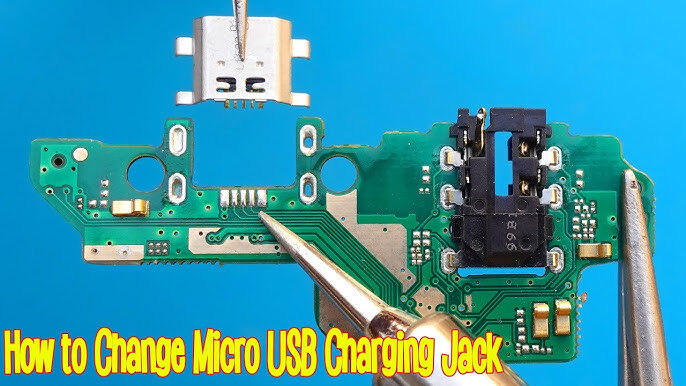
Permanent repair typically involves replacing the charging port assembly or resoldering damaged connections. Professional technicians often inspect the motherboard under a microscope to identify cracked solder joints or broken connector pads. Once repaired correctly, the charging connection becomes stable and reliable again, restoring the smartphone to normal operation.
Temporary Fixes
When immediate repair is not possible, several temporary solutions may help maintain charging functionality:
- Use a new high-quality charging cable.
- Clean the charging port thoroughly.
- Avoid moving the device while charging.
- Use wireless charging if supported.
- Reduce strain on the charging connector.
These methods may extend usability for a short period, but they cannot permanently resolve internal hardware damage.
Permanent Solutions
Permanent repairs depend on the extent of the damage. If the charging port is mounted on a separate charging board, replacing the board is usually straightforward. Devices with motherboard-mounted charging ports require micro-soldering skills and specialized repair equipment.
Many repair technicians prefer replacing the entire charging assembly because it provides greater long-term reliability than attempting partial repairs. High-quality replacement parts are essential for ensuring proper charging performance and compatibility with fast-charging technologies.
Replacing a Smartphone Charging Port
Charging port replacement is often the final solution when cleaning and troubleshooting fail. While experienced technicians perform this repair regularly, beginners should proceed carefully because smartphones contain delicate internal components that can be damaged during disassembly.
The first step involves powering off the device completely and removing any SIM cards or memory cards. The smartphone must then be opened using the appropriate tools. Depending on the model, this process may involve removing screws, heating adhesive, or separating the rear cover.
Once the internal components are accessible, the charging assembly can be inspected. Some smartphones use a dedicated charging board connected by flex cables, while others integrate the charging port directly onto the motherboard. The repair procedure varies depending on the design.
Step-by-Step Replacement Guide
- Power off the smartphone.
- Remove the back cover carefully.
- Disconnect the battery connector.
- Remove protective shields and screws.
- Locate the charging port assembly.
- Disconnect flex cables.
- Remove the damaged charging port.
- Install the replacement component.
- Reassemble the smartphone.
- Test charging functionality.
Following these steps carefully minimizes the risk of accidental damage. Always verify that the replacement part matches the smartphone model before installation.
Common Mistakes During Replacement
Many charging port repairs fail because of avoidable mistakes. One common error is using excessive force during disassembly, which can crack the display or damage internal connectors. Another mistake involves forgetting to disconnect the battery before beginning work, increasing the risk of electrical short circuits.
Using low-quality replacement parts can also create new charging issues. Some aftermarket charging ports fail to support fast charging or provide inconsistent power delivery. Professional technicians generally recommend sourcing parts from reputable suppliers to ensure long-term reliability.
Improper soldering techniques represent another major risk. Excessive heat can damage nearby motherboard components, while insufficient heat may create weak solder joints. Precision and patience are critical during charging port replacement procedures.
Preventing Future Charging Port Damage
Preventive maintenance is far easier and less expensive than repair. By adopting proper charging habits, smartphone users can significantly extend the lifespan of their charging ports and avoid costly hardware replacements.
One of the simplest preventive measures involves keeping the charging port clean. Regular inspections can identify dust buildup before it becomes severe. A quick cleaning every few months helps maintain reliable charging performance and prevents debris from compacting inside the port.
Using high-quality charging accessories is equally important. Cheap chargers and poorly manufactured cables may damage charging contacts or deliver unstable power. Investing in certified accessories helps protect both the charging port and the battery.
Users should also avoid placing excessive stress on charging cables. Pulling chargers by the cable rather than the connector places unnecessary strain on the charging port. Similarly, using the phone while it is connected to a charger increases mechanical stress and accelerates wear.
Best Practices for Charging Port Longevity
| Practice | Benefit |
|---|---|
| Clean port regularly | Prevents debris buildup |
| Use quality chargers | Protects charging contacts |
| Avoid forcing connectors | Prevents pin damage |
| Disconnect carefully | Reduces mechanical wear |
| Keep away from moisture | Prevents corrosion |
| Avoid charging while gaming | Reduces heat stress |
These simple habits can add years to the lifespan of a smartphone charging port.
Conclusion
A damaged charging port can make even the most advanced smartphone nearly unusable, but many charging issues can be diagnosed and repaired successfully. Understanding the warning signs, performing careful troubleshooting, and using the correct repair methods can often restore normal charging functionality without replacing the entire device.
Charging problems frequently originate from simple causes such as dust accumulation, damaged cables, or worn connectors. Before replacing expensive components, users should perform systematic diagnostics and inspect the charging port carefully. In many situations, proper cleaning resolves the issue completely.
When physical damage is present, charging port replacement offers a reliable long-term solution. Whether performed by a skilled technician or an experienced DIY repair enthusiast, the process requires patience, proper tools, and attention to detail. Investing time in preventive maintenance can help avoid future repairs and keep smartphones charging efficiently for years to come.
Frequently Asked Questions
1. How do I know if my charging port is damaged?
Common signs include intermittent charging, slow charging, needing to hold the cable at an angle, visible bent pins, and complete charging failure.
2. Can a dirty charging port stop a phone from charging?
Yes. Dust, lint, and debris can block the charging connector and prevent proper electrical contact between the cable and the charging port.
3. Is it safe to clean a charging port with a toothpick?
A wooden toothpick is generally safe when used carefully. Avoid metal tools because they can damage internal pins or cause short circuits.
4. How much does charging port replacement cost?
Repair costs vary depending on the smartphone model and region. Basic charging port replacements are usually affordable, while motherboard-level repairs may cost significantly more.
5. Can I replace a charging port myself?
Experienced DIY users can replace some charging ports successfully, especially those mounted on separate charging boards. Complex motherboard-mounted ports often require professional micro-soldering equipment and expertise.